

Heat pumps, electric heaters
evcc supports different types of heating devices. Simple devices like heaters or fans can be switched on/off via smart switches. On this page you'll learn how to control heat pumps and electric water heaters directly.
Set up your heat pump or electric heater in the web interface under Configuration → Charging & Heating. All devices listed here are selectable there.
Heat pumps
Many heat pumps support the SG-Ready model, allowing their operation to be adapted to the local energy situation. Up to four predefined scenarios can be triggered. Besides normal operation, an enhanced operation (boost) and a reduced operation (dim) can be signalled.
If solar surplus is available or the grid power is particularly cheap or clean, evcc can switch the heat pump to boost. For dim, the power consumption is reduced, useful during grid constraints or within § 14a EnWG.
Direct communication
Many modern heat pumps offer API interfaces that can set the operating mode and read out device state (power consumption, temperatures …). If your heat pump has an interface we don't yet support, please open a GitHub issue.
Via relay contacts
Older heat pumps often have SG-Ready relay contacts through which the desired operating state can be signalled. Controllable relays are used for this, e.g. Shelly 1.
The relays are connected to the SG-Ready contacts of the heat pump. The exact wiring, the required logic, and the configuration depend on the device and should be discussed with the installer. If there is solar surplus or cheap energy, evcc switches the relays and signals the heat pump to enter the desired operating mode. Ultimately the device itself decides, based on its current state and configuration, whether and how far it follows that request.
The following diagram shows the setup with a single relay for boost mode:
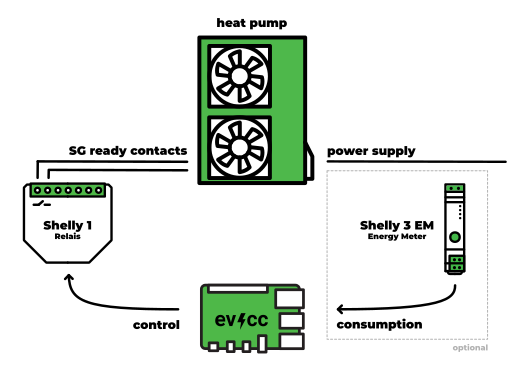
If you want to accurately measure the power and energy consumption of the heat pump, you can optionally install a meter at the device's power supply. This is recommended in almost every case, since the internally reported figures are estimates on many models, or don't cover all components. The diagram shows a Shelly 3EM, but any meter can be used.
No matches.
Supported devices
SG-Ready relay configuration
Configuration with boost relay
This example shows how to configure a heat pump using a Shelly 1 for boost mode and a Shelly 3EM for power measurement.
The type sgready-relay is used for this.
loadpoints:  - title: Meine Wärmepumpe    charger: heatpump_control    meter: heatpump_power    # Hier können auch die bekannten Parameter für loadpoints angegeben werden,    # insbesondere auch um zu kurze Laufzeiten zu verhindern, z. B.    enable:      threshold: -1300 # aktivieren bei 1.300 W Überschuss für 5 Minuten      delay: 5m    disable:      threshold: 150 # deaktivieren bei 150 W Netzbezug für 20 Minuten      delay: 20m # manche Geräte benötigen eine Mindestlaufzeit pro Start (prüfe Spezifikation / Handbuch deiner Wärmepumpe)
meters:  - name: heatpump_power    type: template    template: shelly-3em # Stromverbrauch der Wärmepumpe    host: 192.168.0.102
chargers:  - name: heatpump_control    type: sgready-relay    boost: # Relais für den Boost-Kontakt      type: template      template: shelly      host: 192.168.0.101#   temp: # aktuelle Temperatur (optional)#     source: http#     uri: "http://192.168.0.103/temperature"#   limittemp: # Geräte-internes Temperaturlimit (optional)#     source: http#     uri: "http://192.168.0.103/limittemp"
# [...]
Configuration with boost and dim relays
If your heat pump supports both boost and dim modes, you can configure a second relay for the dim contact. In dim mode, the power consumption of the heat pump is reduced. This is useful for limiting power consumption during grid constraints or within § 14a EnWG.
You can use either two separate relays or a relay with multiple channels (e.g. Shelly with different channel values).
Besides Shelly, other controllable relays are also possible.
chargers: - name: heatpump_control type: sgready-relay boost: # Relais für den Boost-Kontakt type: template template: shelly host: 192.168.0.101 dim: # Relais für den Dim-Kontakt (optional) type: template template: shelly host: 192.168.0.102# power: # Leistungsmessung (optional)# source: http# uri: "http://192.168.0.103/power"# energy: # Energiemessung (optional)# source: http# uri: "http://192.168.0.103/energy"# temp: # aktuelle Temperatur (optional)# source: http# uri: "http://192.168.0.103/temperature"# limittemp: # Geräte-internes Temperaturlimit (optional)# source: http# uri: "http://192.168.0.103/limittemp"
You can optionally add the current temperature (temp), device-internal temperature limit (limittemp), power (power), and energy (energy) via plugin.
These are only used for display and don't control the heat pump.
Status display
Since heat pumps run their own heating logic independently of evcc, the UI shows two states:
- Normal operation – no intervention, the heat pump follows its own control.
- Boost active – a request to increase power. While the heat pump has not yet responded (e.g. due to minimum runtimes or blocking periods), the status shows "Boost requested…".
Preconfigured heat pump types and matching templates already set the required feature flags.
For custom configurations via type: custom, set the matching combination of integrateddevice, heating, continuous, and optionally switchdevice.
Electric water heaters
Plain electric heaters can only be switched on or off by evcc. They are typically connected via a switchable socket. With sufficient surplus, evcc activates the socket (enable) and disables it again when conditions require (disable).
For special electric heaters with their own continuous control, evcc forwards the currently available power to the device. This available power is continuously adapted to the current situation, analogously to charging a vehicle.
evcc offers adjustable limits, with which you can set your desired temperature. This should not be understood as a safety feature. Temperature regulation should normally happen via the thermostat function of the heater itself.