

Proxmox
Proxmox is a virtualisation platform which enables very simple evcc hosting. If you plan to run evcc on a Linux Home server, Proxmox can be a flexible alternative, which makes it possible to install other systems in addition to evcc. An evcc installation on Proxmox then behaves exactly the same way as an installation on a dedicated Linux server.
The following installation has been tested with Ubuntu 24.4.
Manual Installation
Section titled “Manual Installation”-
If not already present on your system, load a current Ubuntu template onto your server.
-
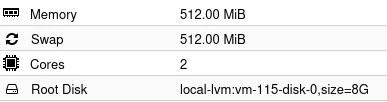
Create a Debian based LX container that is configured with minimal resources. (8G of disk and 512MB of RAM are plenty of resources)
See screenshot:
-
Install evcc as described in the instructions for Debian-based Linux systems Debian, Ubuntu Installation.
-
Update evcc via the Debian package management.
Using Helper Script
Section titled “Using Helper Script”If you prefer to use a script for the installation, copy the bash script under the following link Proxmox VE Helper-Scripts into the Proxmox console.
This way creates a container with 1 GB RAM and since evcc is already installed, you can start directly with the configuration wizard. There are also other useful scripts on this page, e.g. for backups to external systems.